
Google’s innovation knows no stopping! It keeps on surprising us with new features. The king of online search, Google, continuously makes its search algorithms and search engine homepage better. Google Image Search is just one among a host of other search features Google has. Using image search, you can easily find similar images.
For example, if you have a photo on your computer -you can find similar images using Google Image Search! Check it out:
- Go to Google Images Search (http://www.google.co.in/imghp?hl=en)
- Drag and drop an image from your computer onto the Google Images Search page. Or you can simply upload the picture by clicking on the camera icon given in the search box.
- Google will upload your image into its database
- It will then analyze your image and search for the similar images
- In search results you’ll get a list of images that Google thinks are similar to the image provides by you
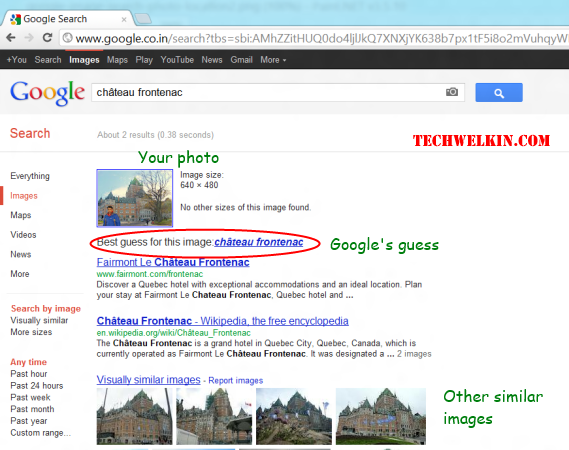
Google has correctly guessed the location where photo was taken
ALSO READ: Find location of taking a photograph using Google Image Search
Remember, this search is done by analyzing the provided image –it is not a search based on the name of the image. To test it, from Google Images, I downloaded a photograph showing a camel. I renamed the photo as “royal Bengal tiger” and then followed the above steps to find similar images.
And guess what!
I failed to confuse Google and it found me lots of images of camel!
This is how you can also find similar images using Google Image Search. Please let me know if you have any questions about this topic. I will be happy to try and help you. Thank you for using TechWelkin.
There used to be a tab that allowed me to view the full image and drag and drop the image also but now the tabs gone. Has something changed?
Hi there, can I drag a picture from Google images to my YouTube channel ‘banner’. If so, how would I do this?
I can get an image, upload this image to google search or drag and drop to the searcher textbox. But the thing that I want to do is Google Search Engine search the similar images inside MY OWN WEBSITE, not in all the web. It doesn’t matter if I must to pay, but what can do??
Hi Cristian, you should your developer to check out Google’s Image Search API. Google does not provide a solution that you need, but you can develop it yourself with API.
Hi Lalit, I tried with your suggestions, but there was no related information about this photo in google. Thank you very much for your help.
Mr. Lalit Kumar I have been searching a unknown mountainous place that appears in a black and white old picture in the web. This picture were taken in 1943 apparently in Iran. It shows a mountain range with a saddle of two hills or peaks. I used the way you explained with Google images, but there were no similar matches. I would appreciate your help a lot.
Hi Jose, your question interests me. Probably Google doesn’t know anything about that place. Or may be it is not able to connect the picture you have with the related information available on Internet. There isn’t much we can do about it. May be you can search for phrases like “peaks in Iran” or “photography in Iran in 1943″… far-fetched, but you never know what Google may throw at you! All the best!
sr i want to know that if i download image through google image
and upload that on my website with my valuable text contain….
then whats a copyright problem or any other problem.
can i do this with having free mind without thinking such problem
suppose i am going to write contain on health and i downloaded image from google image related with health and upload with my contain on my website
any problem …. suggest me
pz reply me fast i have another question
Most images on Internet are copyrighted. You may take images from Google's search but mostly they are copyrighted and the owner may object if he wants to.